

The year started at full speed on the AI front, with Apple announcing a strategic partnership with Google, and Anthropic releasing Claude Cowork.
We are at an inflection point in AI maturity and adoption, which means that, if you are starting a company this year, it makes sense to build an AI-native company.
Any company, even in a traditional industry, can be AI-native if it is decisive about using generative AI across the organization. Being AI-native is not just about using AI chatbots or vibe-coding apps. It means systematically automating repetitive tasks at the individual and team level, so that AI augments everyone’s productivity.
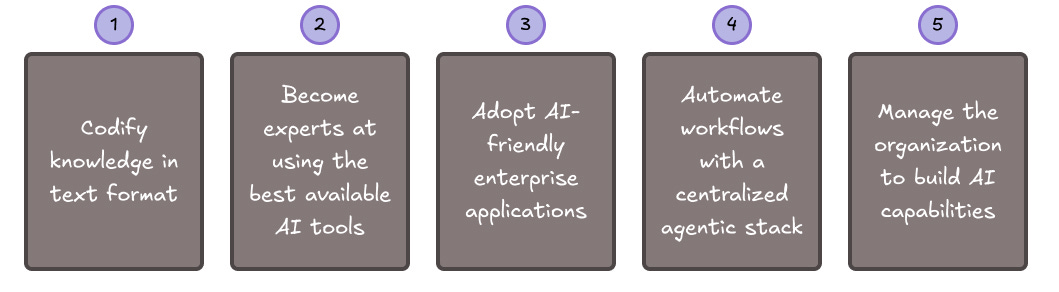
As far as I can see, there are 5 things that AI-native companies do consistently:
Codify knowledge in text format.
Become experts at using the best available AI tools.
Adopt AI-friendly enterprise applications.
Automate workflows with a centralized agentic stack (this is going to be the hot topic in 2026!).
Manage the organization to build AI capabilities at every level.
Codify knowledge in text format
The biggest AI adoption challenge for traditional companies is access to internal knowledge. Large language models do their best work when they can easily ingest company knowledge in text format.
Yet, at many companies:
Standard operating procedures are poorly documented or executed differently from the way they are documented.
A lot of knowledge is codified in formats that are hard to access (hard drives, departmental silos) or that LLMs are not good at reading (slides, PDFs, spreadsheets).
At AI-native companies, each department head is accountable for maintaining a knowledge repository that AI assistants can leverage for context.
The knowledge repository must meet the following requirements:
Format: primarily structured text (e.g., Google Doc, Markdown).
Metadata: each file’s content must include a header with a title, summary, keywords, reliability score, and creation and modification dates (also called “front matter”).
Access: each folder can be accessed by authorized AI assistants (e.g., via a service account or an API key for a MCP tool connected to a RAG vector database).
In 2002, Amazon introduced the “Bezos API Mandate” stipulating that each team must expose its data and functionality to other teams through service interfaces and that anyone who does not do this will be fired. In a way, in 2026, as a CEO, your “AI mandate” should require teams to expose their knowledge repositories to one another and to AI agents in text format.
Become experts at using the best available AI tools
In addition to chatbots, there is a growing number of specialized AI-powered apps that significantly improve employee productivity.
AI-native companies are experts at using these tools.
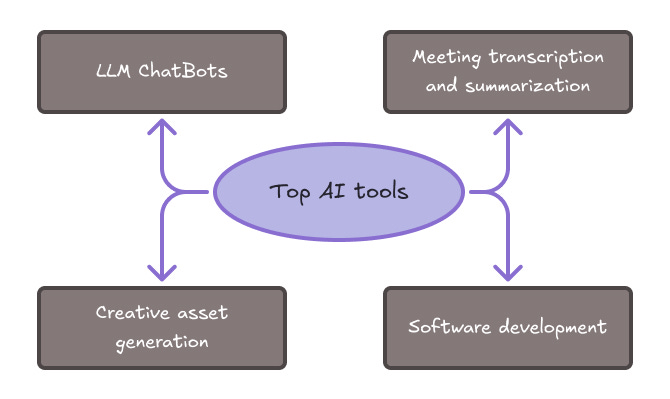
Chatbots
At AI-native companies, all employees have access to at least one company-approved chatbot subscription, and power users can request additional subscriptions.
Not all chatbots are equally great at everything. Power users switch between:
Claude for tutorials and problem-solving in technical domains.
Perplexity to speed up web searches.
Google Gemini for image and video generation, and for book/article reading when combined with NotebookLM.
ChatGPT for brainstorming and writing, and for day-to-day/lifestyle questions.
Microsoft Copilot …. when their company’s security policies block other chatbots.
Occasionally, Manus is used for tasks that require extensive internet browsing and clicking, as well as data collection and analysis.
Power users also have strong written communication skills, enabling them to give clear instructions to chatbots. (This is sometimes called “prompt engineering.”)
Recommended in 2026: Claude, ChatGPT, and Gemini all do a fine job.
Meeting transcription and summarization
Every meeting should be automatically recorded, summarized, translated (if it’s not in English), and converted into knowledge, summaries, and action items, which are fed into the company’s systems.
Google and Microsoft’s native meeting recording tools are strong at recording and transcription, but weaker at integrations.
Specialized apps like Zoom, Otter, and Fireflies, which can be used alongside these tools, offer extensive CRM integrations. IT administrators like these cloud-based solutions because they don’t require installing untested software on employee laptops, and make it easy to store all content centrally, which is important for sales and customer service teams.
If you are a sales leader, you should regularly review your team's call transcripts and provide feedback (possibly with AI assistance).
A point of caution: I find these apps overly eager to create to-dos, and I would not recommend automating task creation without a human-in-the-loop.
Some people find it intrusive when AI meeting recorders join video meetings. For that reason, some companies (such as VC investors) use apps that run directly on their laptops/phones (e.g., Granola, Notion Meeting Notes) or on standalone devices (e.g., Plaud). But this is the exception rather than the rule.
Recommended in 2026: Fireflies, for its ease of use and its convenient API (to customize how meeting data is imported into company systems). Combine it with a systematic process that imports relevant information into your departments’ knowledge repositories.
Creative asset generation (brand, marketing, product)
No doubt, image and video creation are some of the most impressive capabilities of generative AI.
In my view, this is an area where we moved from “anyone can create an agency-quality ad” to “we still need creatives with world-class skills and taste, who are also experts at AI-powered content production”. Not many people have the taste and attention to detail required to move across multiple design tools and deliver stunning, original assets.
AI-native creatives juggle multiple models and tools like Google Flow, Reve, Krea, Leonardo, Kling, HeyGen, Descript, Wan, ElevenLabs, and others.
Rather than sticking to a single ecosystem, it makes sense to use a model aggregator that supports the end-to-end production workflow, such as Weavy (now part of Figma) or Higgsfield.
Recommended in 2026: Weavy for their diverse model choices.
Software development
At the time of writing, the best coding assistants are Claude Code (with Opus 4.5) and Cursor (with several available models). Both are concise and smart. Claude Code is more forgiving if your instructions lack precision.
If your company has a software engineering department or subcontractor, it is essential that they have access to the best tools and know how to use them.
Even if your company is not a tech company, you will have a core group of analysts/engineers who use coding assistants to automate processes.
AI-native companies make advanced use of AI coding assistants:
They employ experienced software engineers to design system/application architecture and development workflows, and review AI-generated code.
They generate most of the new code by typing requirements in text.
They use distinct agent roles to execute the sequential phases of feature development (requirements, architecture, ticket creation, development, testing).
They launch multiple agents to work in parallel (3-6 per person).
They customize the assistant configuration with rules, skills, subagents, and MCP tools (including technical documentation tools).
Recommended in 2026: Claude Code + Cursor.
Adopt AI-friendly enterprise applications
There are dozens of startups re-building enterprise SaaS suites with an AI-first approach. Their goal is to become the next Microsoft Office (for documents), Slack (for messaging), Atlassian (for task management), Salesforce (for CRM), SAP / Oracle (for ERP), Workday (for HRIS), or Microsoft (for all of the above).
These offerings are not yet fully mature. It takes a long time to develop fully featured enterprise SaaS offerings, and to have all the functionality required for your business and your countries of operation. That’s the reason why, although open-source software has been around for a long time as an alternative to these software giants, most companies still rely on proprietary enterprise solutions.
In my view, it is much more important to adopt AI-friendly than AI-first applications.
AI-friendly applications are committed to adding AI-powered features over time, but, more crucially, they have a track record of being developer-friendly, allowing enterprise and third-party integrators to easily build custom features on their platforms. They have extensive, consistent, stable, and well-documented APIs, as well as a large existing ecosystem of third-party integrations.
By contrast, SaaS vendors become obstacles to AI adoption by making it hard for enterprises to build custom integrations quickly and iteratively. For example, they make their documentation hard for AI assistants to navigate and have long approval times for new API keys and integrations.
In the sections below, let’s review the main types of enterprise software and the main solutions available to someone building a new company in 2026.
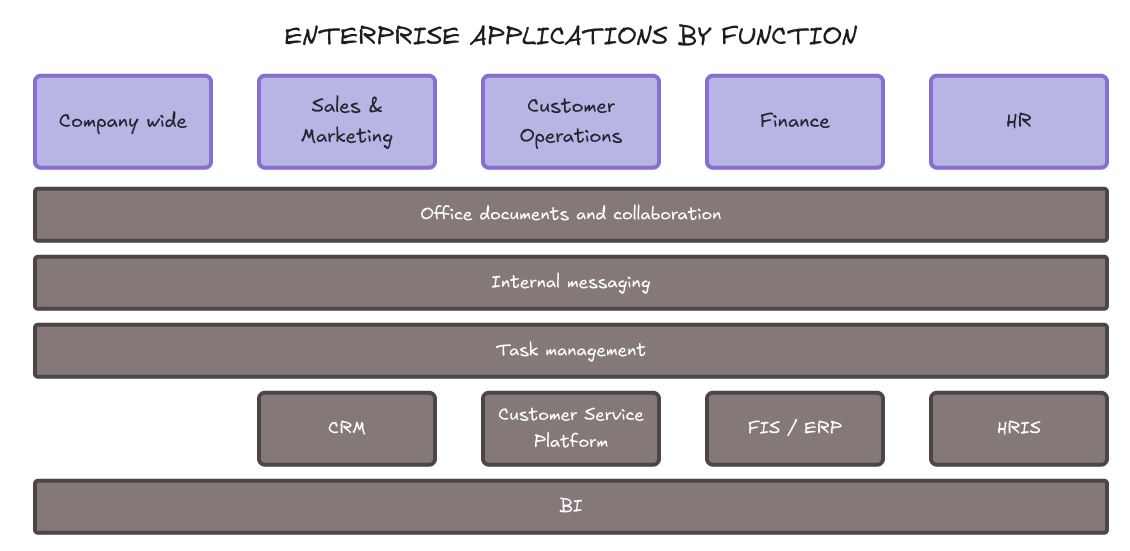
Office documents and collaboration
For email, docs, spreadsheets, and presentations, the Google Workspace ecosystem wins for two main reasons:
Google Workspace is definitely, unapologetically cloud-first. It offers an integrated experience that AI assistants can easily get their “heads” around, unlike Microsoft’s, which is fragmented by service, platform (local vs. cloud), and environment (work vs. personal). Fragmentation confuses AI assistants.
The start-up ecosystem’s integration with Google products is unparalleled. Whatever your specialized productivity need, there is likely an integrated AI app or Chrome extension being built to address it. And if there isn’t, vibe coding your own integration is pretty easy.
Recommended in 2026: Google Workspace.
Internal messaging
Slack’s open architecture and extensive ecosystem of integrations make it the winner, for now, compared to Microsoft Teams, for example.
Building an AI-powered Slack integration and getting it approved by your system administrators is surprisingly easy and well-documented.
Recommended in 2026: Slack (or Discord for an affordable alternative).
Task management
Linear has become the go-to task management app for modern tech companies (such as OpenAI), while competitors like Atlassian and Asana have become bloated and slow.
Linear was initially designed for software developers, but it is appreciated by other audiences for its speed, simplicity, keyboard shortcuts, and powerful API. Its MCP server can be integrated easily with any AI assistant that supports it.
Recommended in 2026: Linear.
CRM (Sales and Marketing)
Salespeople dislike Salesforce because it is clunky and expensive to set up, yet even OpenAI and Anthropic reportedly use Salesforce for Enterprise sales. Salesforce’s superpower is its more granular user permissions than HubSpot and other CRM systems.
Having said that, if you are starting a company in 2026, Salesforce is likely overkill. HubSpot is a common choice among smaller companies.
Whatever the choice, the ideal user experience should be that my emails and meetings are automatically used to enrich CRM records, and I can use idle time in the subway or at the airport to converse with my AI assistant, who fills in the gaps and updates opportunity sizes and timeframes on my behalf. To make this happen, you need to create your own agentic workflows. More on this later.
Recommended in 2026: HubSpot + custom agentic workflows.
Customer success/service
Many tech companies are working to reinvent customer service using AI. Up-and-coming players include Sierra, Aisera, and others. Among established companies, Intercom, ServiceNow, Salesforce, and Zendesk have been communicating heavily about their new AI features.
From what I hear, Intercom works really well and is developer-friendly. It also has a strong track record of reliability and security.
Recommended in 2026: Intercom.
FIS and ERP (Finance, Supply Chain)
AI-native companies like Campfire (ERP) and Aleph (Financial planning) are getting good reviews, but established modern applications like NetSuite, Workday, and Rippling remain top choices thanks to their broad functionality. More affordable alternatives like Zoho Books are still popular, with robust APIs.
Recommended in 2026: Zoho Books, NetSuite, or Workday, depending on your needs and budget, plus custom agentic workflows to get really powerful automations. But before signing on, check if they impose any restrictions on API integrations.
HRIS
In this category, too, newer startups like Warp and HiBob are getting good reviews, but Workday and Rippling remain strong contenders. More affordable options exist for smaller companies, but the list varies by country. Providers include Employment Hero and BambooHR.
Recommended in 2026: varies by country, but HiBob and BambooHR are both solid choices.
BI (Business Intelligence, Analytics)
One of the promises of AI applications like Omni and Fabi is that every employee should be able to query company data in natural language and get whatever report they need to make business decisions.
We are not there yet, not because of the limitations of AI technology but because of how fragmented and messy company data often is.
Setting up a centralized warehouse, supported by strong analytical and visualization capabilities, is the necessary first step. From that standpoint, the Google Cloud environment is capable, easy to use, and easy to expand, with BigQuery for the data warehouse, Looker for visualization, and needs-specific services for data import and processing.
Recommended in 2026: Google Cloud.
Automate workflows with a centralized agentic stack
AI-native companies use agentic workflows to automate tedious processes.
Examples of use cases include:
Parse and pre-approve invoices and expenses before any Finance team member sees them.
Filter candidate applications before any recruiter looks at them.
Generate lists of qualified customer leads for the sales department.
Analyze customer emails and meeting recordings to automatically update the CRM.
Enable employees to quickly and comprehensively search the company’s knowledge base.
Send personalized communications to customers and employees.
Read customer and vendor contracts to highlight problematic clauses.
And much more.
An agentic workflow is a work process delegated to one or several AI assistants, each equipped with instructions and tools, in which the assistants demonstrate some degree of autonomous decision-making. Tools are capabilities beyond simple chats, such as reading files or data, updating a database, browsing the internet, or sending messages. They can be thought of as plugins or connectors.
Today, enterprise applications tout their agentic capabilities, yet most are not mature enough to support your company’s complex workflows. You end up paying an integration consultant to make Salesforce or ServiceNow agents work.
And yet, thanks to coding assistants, it has never been easier to create custom apps that execute almost any of your company’s workflows.
AI-native companies make it easy for departments to automate their workflows using AI agents:
Their CEOs prioritize the highest-payoff opportunities.
They define a centralized architecture for agentic workflows: what tech stack, where to host the agents, and who is responsible for maintaining shared tools.
They build small teams of AI leads in each department, who are responsible for getting AI automation projects underway before handing them over to regular teams.
They build evaluation and safety standards to monitor and improve the performance of AI agents.
There are two ways to implement agentic workflows: generalist agents and specialized agents (predefined workflows).
Generalist agents
A generalist agent is an off-the-shelf AI chatbot equipped with connectors to your work accounts.
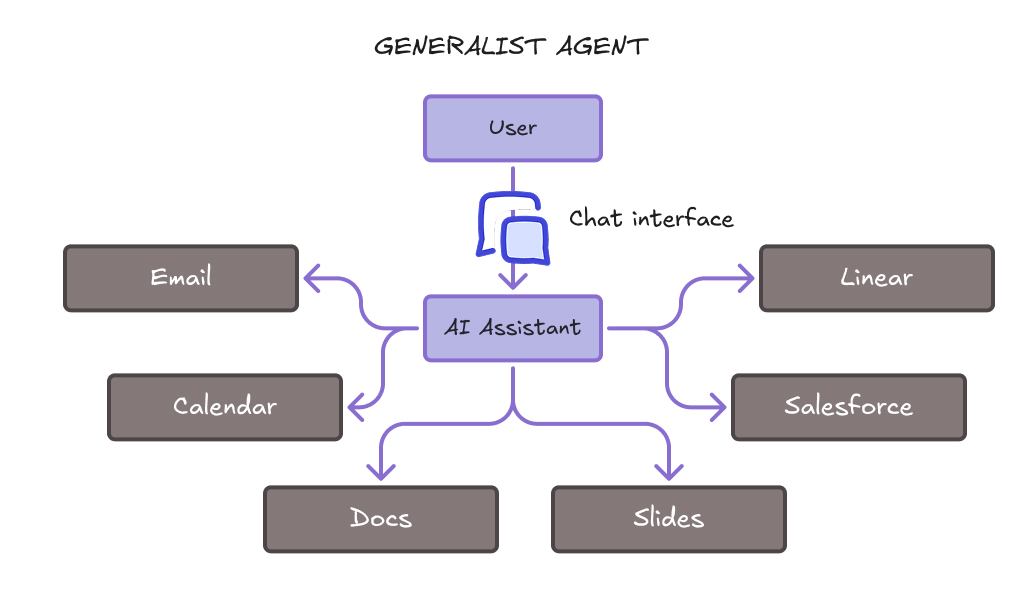
It may run on your laptop (e.g., Claude Desktop, ChatGPT Desktop, ChatGPT Atlas, Perplexity Comet, OpenClaw - formerly known as ClawdBot) or in the cloud (e.g., Microsoft 365 Copilot, Manus, RelevanceAI). Based on its conversation with you, it can take actions on your behalf with your files, online, and/or via APIs.
Frequent use cases include:
Reorganizing your files and folders.
Summarizing PDFs or documents.
Summarizing your Gmail inbox.
Helping to prepare your upcoming daily appointments.
Querying services like Linear, Asana, Notion, Salesforce, or HubSpot via a chat interface.
Generalist agents can speed up many tedious tasks, but generally fall short of reliably managing business-specific, rules-based workflows.
Recommended in 2026: Claude Cowork.
Specialized agentic workflows
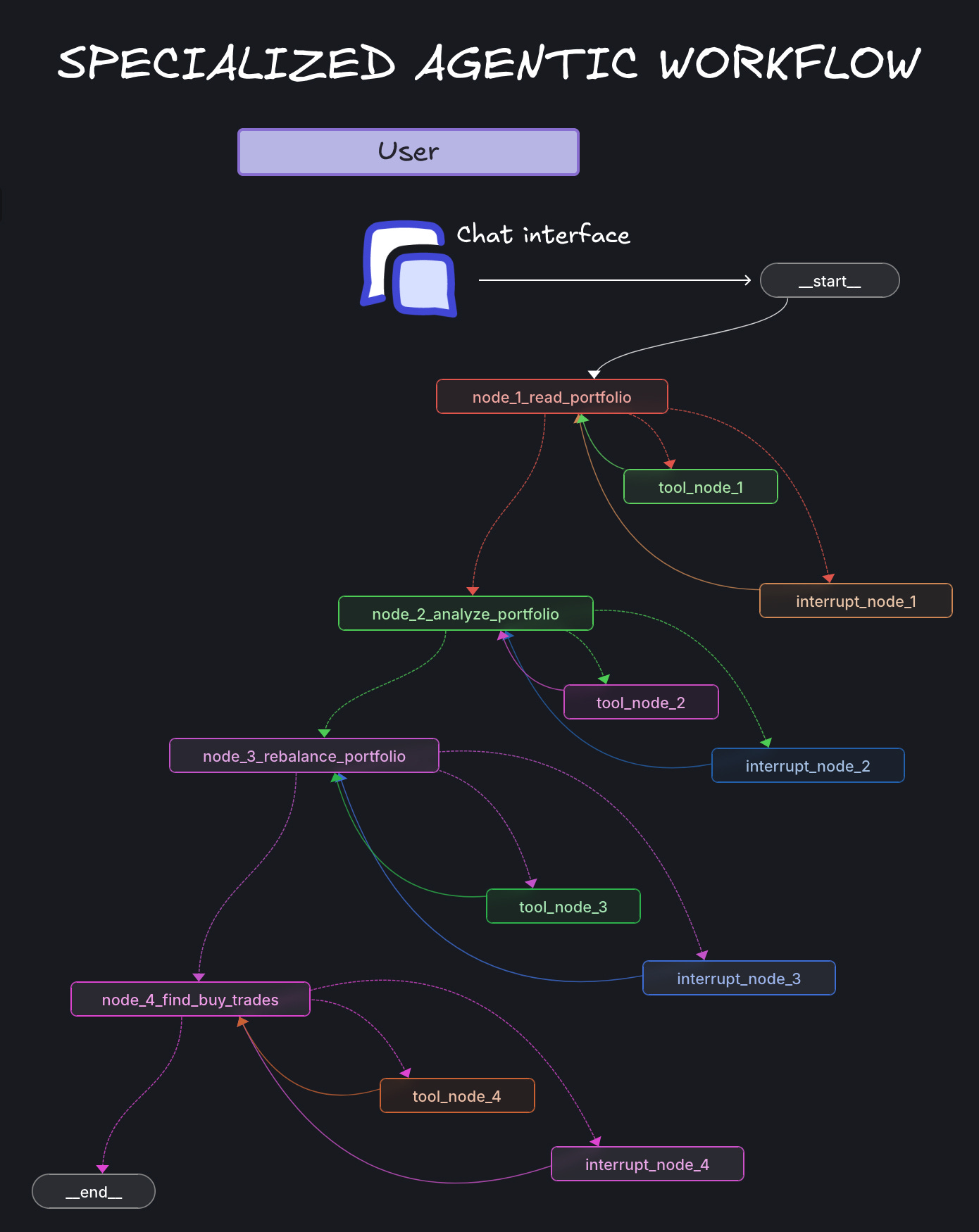
Specialized agents will be big in 2026. They are usually run in the cloud, meaning that they are active even when you are not at your computer. Each agent specializes in a single workflow, broken down into predefined steps (“nodes”), each of which is delegated to an AI assistant that can exercise some degree of autonomy in completing the step using tools and/or requesting additional input from the user.
Specialized agents aim to be more deterministic and auditable than generalist agents. For example, at AGENTINI, we deploy custom workflows to support the end-to-end proposal writing/quotation preparation process, among others.
Some companies use a no-code platform like Zapier, Make, N8N, or Microsoft (Copilot Studio, Power Apps) to create basic agentic workflows. But no-code platforms still have significant limitations. They focus on generic use cases that apply to many companies, and they are not designed to handle tasks that take several minutes or several hours (such as parsing PDFs or images). Companies using these tools risk focusing on the workflows that are easiest to automate, rather than those that deliver the biggest payoff for the business.
By contrast, AI-native companies use custom instructions and tools for their AI assistants, while centrally leveraging established frameworks such as Langchain or CrewAI to orchestrate these solutions. LangChain and LangGraph, in particular, are widely used by companies like Uber, LinkedIn, Replit, Elastic, Cisco, GitLab, and Vodafone.
Here is an example of what a LangGraph workflow looks like:
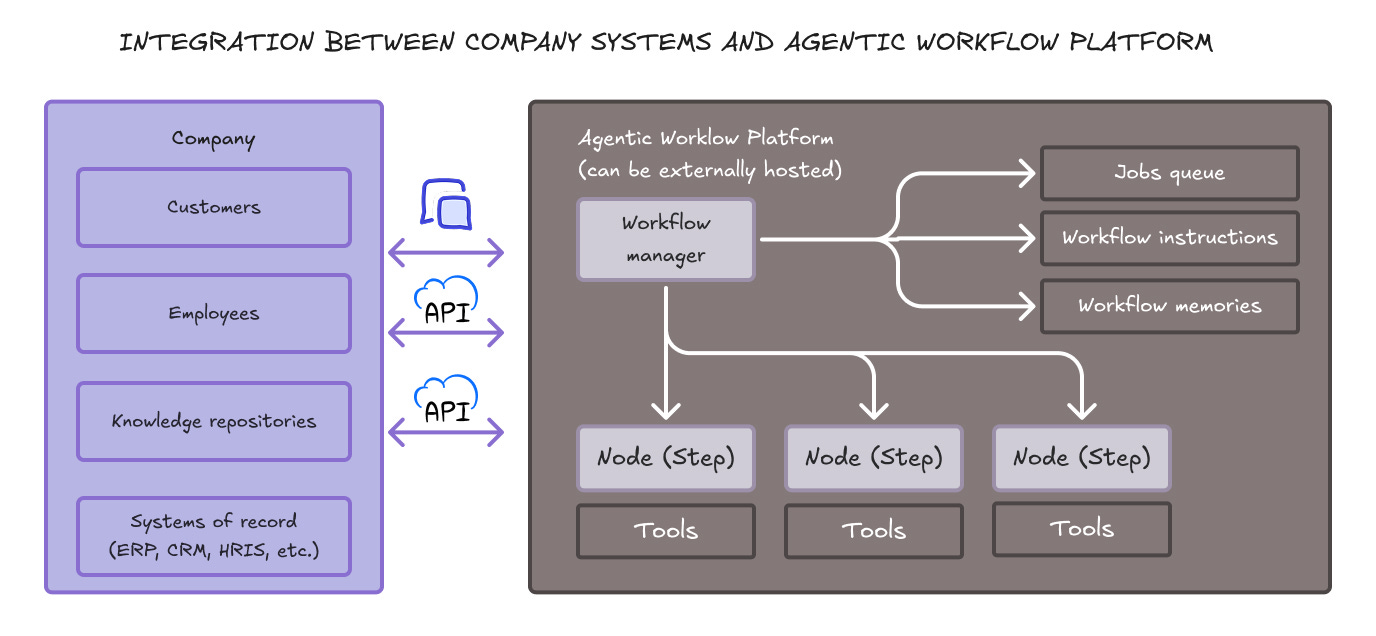
When building an agentic workflow platform, what’s most important is to integrate the company’s customers, employees, knowledge, and systems of record with AI-powered business rules. This usually involves a combination of generic tools and custom-developed ones. This means that your AI team must take ownership of both internally maintained and outsourced data stores and tools that align with your company’s specific workflows.
Manage the organization to build AI capabilities at every level
AI-native companies typically start by mandating a mostly dedicated central AI team, led by the CEO. This does not mean that experimentation is discouraged in other parts of the organization, far from it. But keeping track of the industry’s rapidly evolving trends is too challenging to be left to individual initiative.
Team members can continue to report to their departments, but they must allocate at least 50% of their time to the task force. They prioritize AI initiatives, own and maintain methods, reference architectures, and shared tools, and mobilize like “SWAT teams” to help departments get their AI projects started.
When forming their AI team, companies often assume they need AI experts. The truth is, they need experts in applying AI, not in creating it. Anyone can become an AI expert if they are 1) more than 50% dedicated to the task; 2) tech-savvy (can write and read Python code); 3) experienced enough with the business to quickly understand business processes and prioritize areas where AI is useful; 4) pretty smart and resourceful; and 5) strong written communicators.
Over time, each department must embed AI capabilities within its own org.
Wrap-up
Building an AI-native company in 2026 involves reimagining how work gets done and treating AI capabilities as core infrastructure, much like internet connectivity or cloud computing became table stakes in previous decades.
The five pillars outlined in this post work together. Codifying knowledge in text makes it accessible to AI tools. Expertise in those tools enables employees to work more effectively. AI-friendly enterprise applications provide the foundation for integration. Custom agentic workflows automate repetitive tasks. And building organizational AI capabilities ensures these advantages compound over time.
The companies being founded today have an extraordinary opportunity. They can build AI-native processes from day one, avoiding the painful retrofitting that established companies must undertake. But this window won’t stay open forever.