

It’s January 2026, and every business founder wants to experience the thrill of automating their company’s work with AI agents. Where to start?
There are plenty of agentic tools and platforms, ranging from no-code platforms like n8n, Lindy, and Gumloop to the current king of vibe-coding, Claude Code, and of course, the current community favorite, OpenClaw (formerly known as ClawdBot). How to choose?
Below is a set of tasks you can complete at your own pace to become proficient in AI agents. There is no right or wrong answer, but some “solutions” are included at the end of the blog post.
Clarify your goals
It’s easy to get lost or keep switching tools when you are unclear about what you are trying to achieve. The first question is: what workflow are you trying to automate?
The criteria for workflow selection are as follows:
The workflow should be digital and document- or message-based. Obviously, AI agents aren’t going to carry your groceries. They also won’t be very effective at tasks that usually require a human-to-human conversation (e.g., sales pitch, check-in with your direct reports).
It’s something that you do every week and takes more than 1h/week. If the payoff isn’t there, it does not make sense to invest in automation.
The workflow can be documented in a memo you’d send to a team of college-level interns assigned to you for 2 weeks. You should assume that AI agents are pretty knowledgeable and smart, but lack judgment and do not learn through experience.
For this post, let’s take one workflow and implement it using various approaches. Let’s call it “my private banker.”
Introducing “my private banker”
“My private banker” is the workflow we’d like to automate. It generates investment ideas about once a week. She is not a hedge-fund genius, just a rigorous, hardworking advisor who researches the news and markets when you don’t have time to do it yourself on TradingView.
Her workflow consists of the following steps:
Calculate the value of your investment portfolio
Compare its composition with your target asset allocation.
Recommend 1-2 assets to sell to rebalance the asset allocation if required.
Look for high-quality, undervalued assets and recommend 1-2 tickers to buy.
Could “my private banker” be an AI agent? Let’s find out.
Prerequisites
First, write down your current portfolio in a Google Sheet. For example:
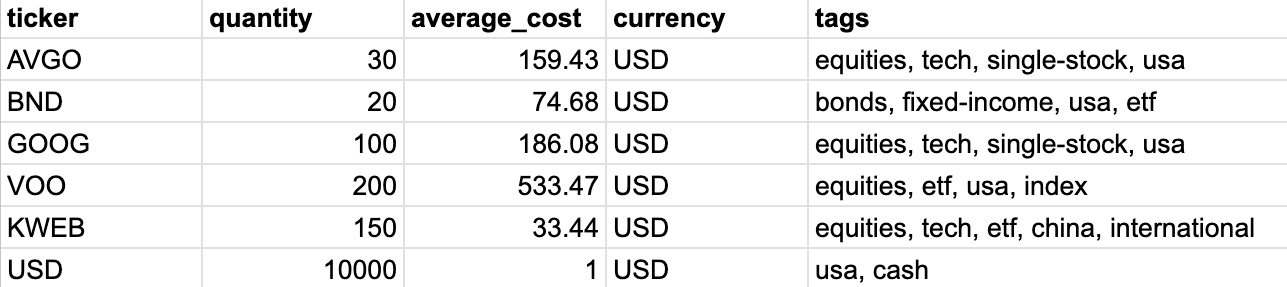
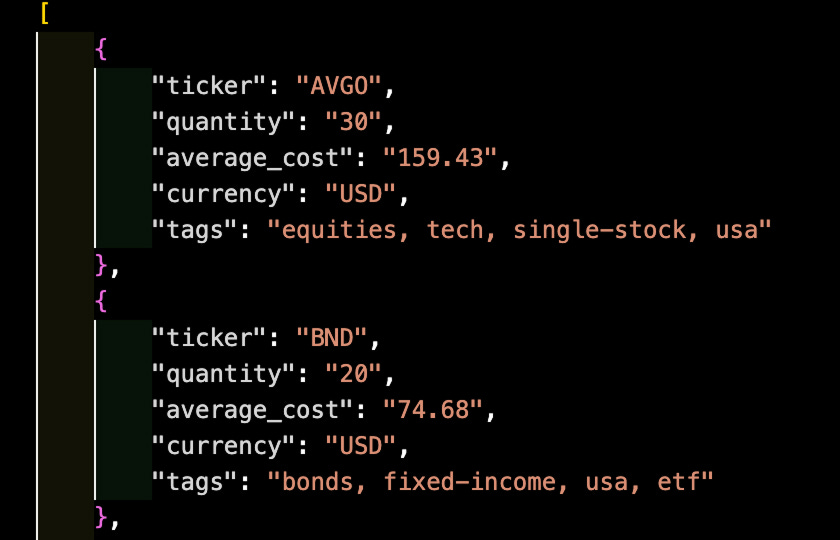
Generative AI models actually prefer to read JSON format. A JSON list is enclosed between square brackets, with individual items enclosed between curly brackets. If you’d like to quickly convert your Google Sheet data into a JSON list, you can find a utility at the end of this post.
To complete the proposed exercises below, you will need accounts for the following online services:
Chatbots: I recommend gaining experience with Claude, ChatGPT, Perplexity, Google Gemini, and Manus.
Financial data: get a free API key from Alpha Vantage.
No-code platforms: Use a n8n trial account.
Developer tool accounts: GitHub, Cursor, and Ona (using your GitHub account for login). Also, download Cursor onto your computer.
Using Chatbots
Task #1
Let’s start simple and see if Claude, ChatGPT, or Perplexity can generate investment recommendations for you.
To get the most out of chatbots, you’ll need to gain the following skills:
Learn from hands-on experience which chatbot is good at what.
Develop strong written communication skills to give clear instructions to chatbots. (This is sometimes called “prompt engineering.”)
So let’s do that.
✍️ Your first task: Create a detailed prompt instructing the chatbot to create trade recommendations based on your own goals and criteria, and run it in a few chatbots.
You can activate “deep research” when available and, in Perplexity, toggle the “Finance” tool to see if you are getting better results that way.
⏰ Complete the task, then continue reading below. There is no right or wrong answer; just do your best, and then you can see what I’ve come up with.
Results
The verdict? Pretty interesting in my case.
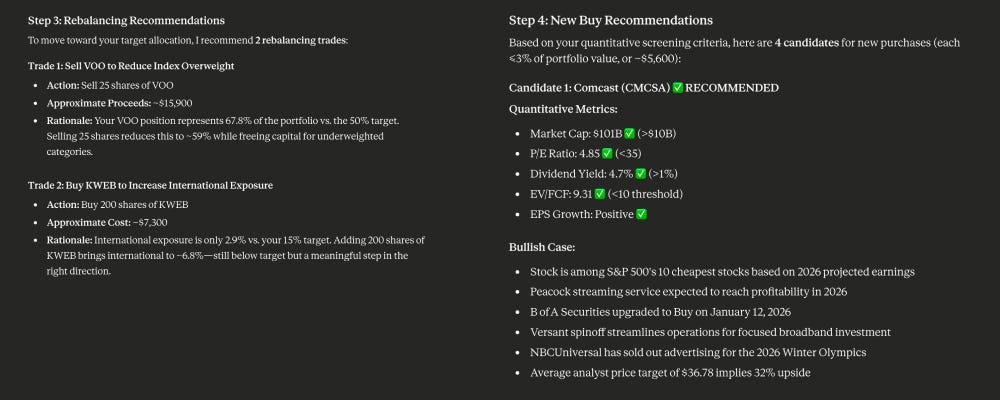
Asset allocation and portfolio rebalancing. The chatbots can retrieve market prices by searching free websites and correctly analyze my test portfolio. Their recommendations differ slightly, but they all make sense in the context of my assets and goals: Claude recommends selling VOO (U.S. index ETF) and buying KWEB (Chinese tech ETF), whereas Perplexity recommends selling AVGO (overvalued) and buying BND (fixed-income ETF).
New investments. All chatbots offer interesting recommendations, though they differ. Claude recommends buying CMCSA, VZ, BTI, and DUK, whereas Perplexity recommends KO, JPM, and UNH. Their recommendations are based on a combination of fundamental indicators (e.g., PE, P/FCF), technical indicators (e.g., RSI), and news/analyst commentary. The Perplexity assistant, who has access to a professional-quality financial dataset, did a better job of collecting indicators than Claude, who performed web searches like “most undervalued stocks in the U.S.” to find the data.
You can see my prompt at the bottom of the post.
Task #2
Let’s push further and see if we can complete a deeper technical analysis.
✍️ Your second task: Aggregating the buy recommendations from all chatbots, create a detailed prompt instructing each chatbot to further evaluate and rank these stocks according to a list of criteria defined by you.
Try it in a few chatbots.
⏰ Complete the task, then continue reading below.
Results
Here, I reached the limits of what chatbots can do with their off-the-shelf web search and data analysis capabilities.
The only chatbot that could finish the task is Perplexity, thanks to its access to a professional-quality financial dataset. High-quality financial data is usually not free or cheap online. If my metrics were based on intraday financial data, none of the chatbots would have succeeded.
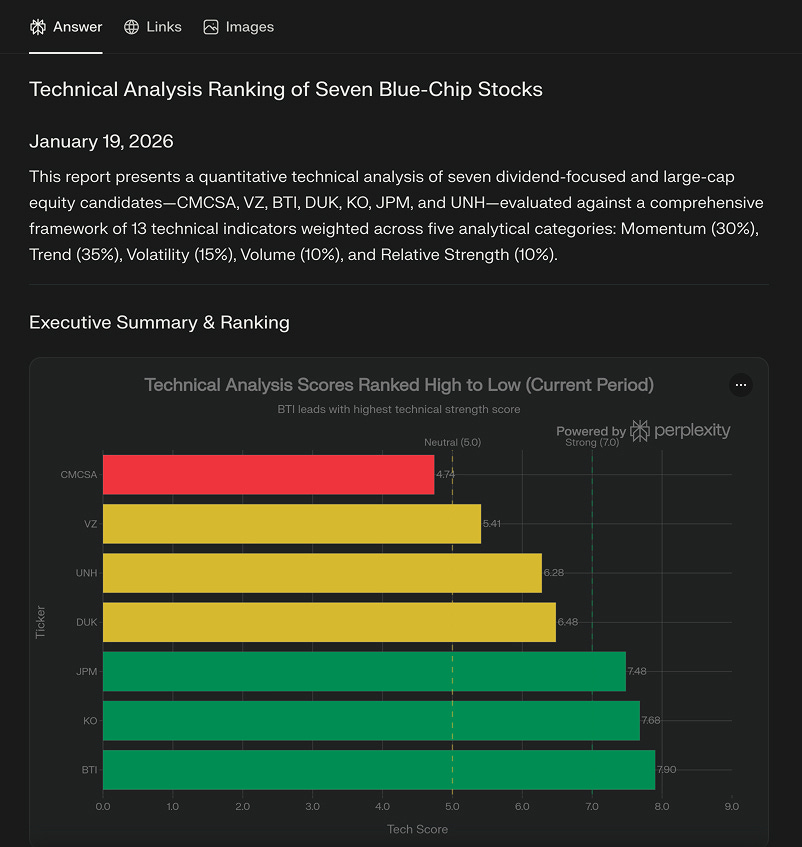
You can download my prompt at the bottom of the post.
Conclusion so far: The only way for a chatbot to complete the task is to have access to a specialized financial data-collection tool. Given that other chatbots like Claude and ChatGPT don’t offer this tool, can we equip them with one?
After all, in a business context, it is highly unlikely that your chatbot will have access to your industry’s specific data sources, so you’ll need specialized tools.
Using a generalist agent with specialized tools
Task #3
A generalist agent is an AI chatbot equipped with tools that connect to your personal or work accounts.
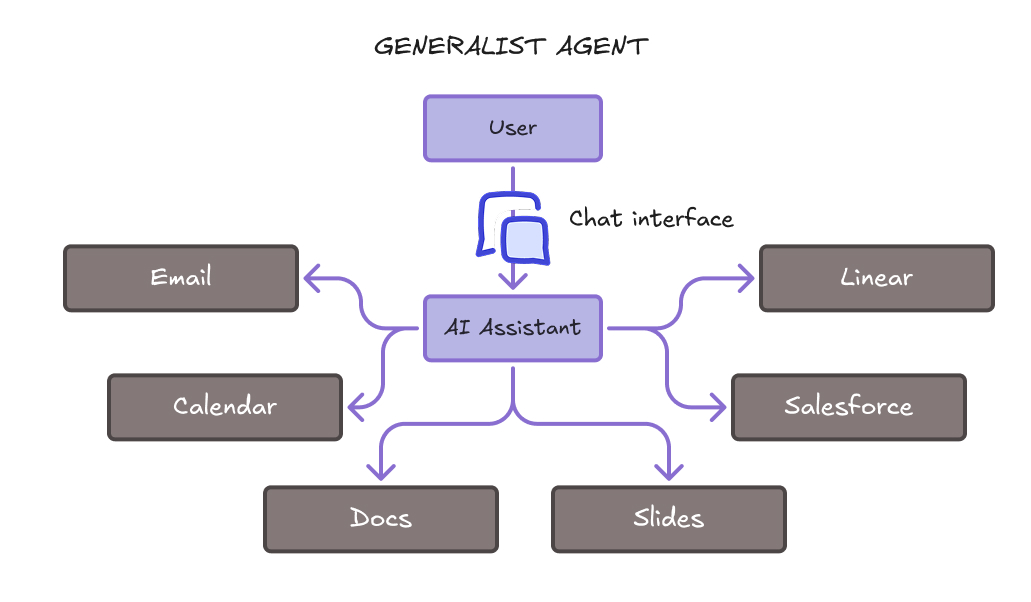
The chatbot may run on your laptop (e.g., Claude Desktop, ChatGPT Desktop, ChatGPT Atlas, Perplexity Comet, and the much-hyped OpenClaw) or in the cloud (e.g., Microsoft 365 Copilot, Manus, RelevanceAI). Based on its conversation with you, it decides what actions to take on your files, online and/or through APIs on your behalf. It usually asks for your approval first, though.
Let’s equip a generalist chatbot (e.g., Claude) with a specialized financial data analysis tool powered by the Alpha Vantage online service.
✍️ Your third task: Configure Claude with the Alpha Vantage MCP tool, and then run the second prompt again.
To configure Claude with the Alpha Vantage MCP tool, follow the instructions here. Then test the integration by asking the chatbot: “Can you check if you have access to the Alpha Vantage MCP tool?” Finally, run your prompt.
You can also equip other chatbots with tools. If you try OpenClaw, make sure you research how to install it properly and patch the security vulnerabilities that non-technical users encounter.
⏰ Complete the task, then continue reading below.
Results
Claude can now create a spreadsheet comparing all the stocks against my quantitative evaluation criteria.
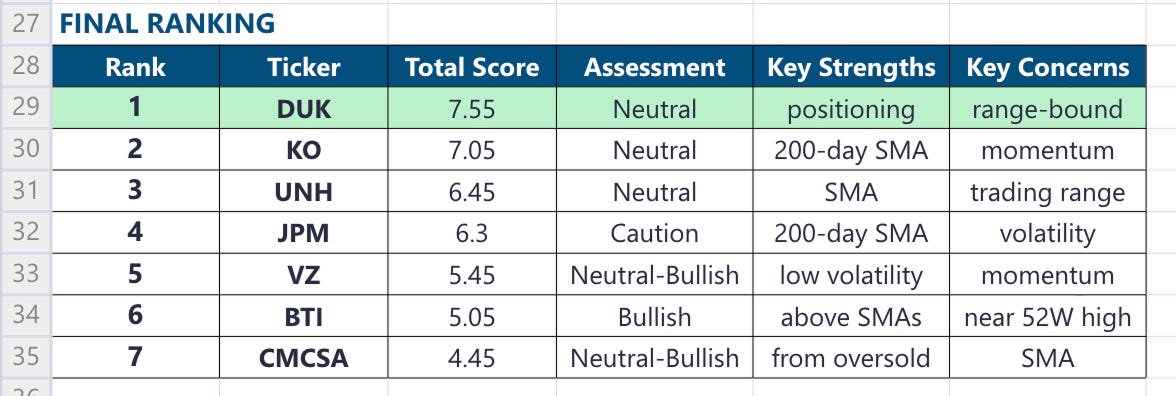
My prompt was the same as in task #2, but what changed was equipping Claude with the Alpha Vantage MCP tool.
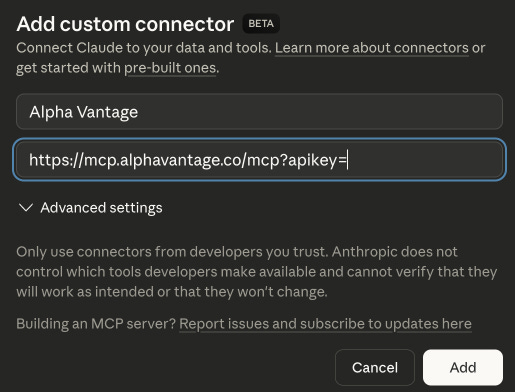
Conclusion so far: This example shows the power of tools. In an enterprise context, you can imagine how important it is to create tools that connect AI agents to the company’s data to produce relevant outputs.
However, the chatbot approach does not eliminate all manual work. We had to query several chatbots, aggregate their buy recommendations by hand, then go for a second round of analysis, all the while staying in front of our screens to prompt the chatbots and read their answers. Could all of this happen automatically instead?
Using a specialized agent on a no-code platform
A specialist agent specializes in a single workflow, broken down into predefined steps. This is interesting for enterprises because it means the agent’s behavior is more predictable than that of a generalist. Each step is delegated to a dedicated AI assistant that executes specific instructions in natural language.
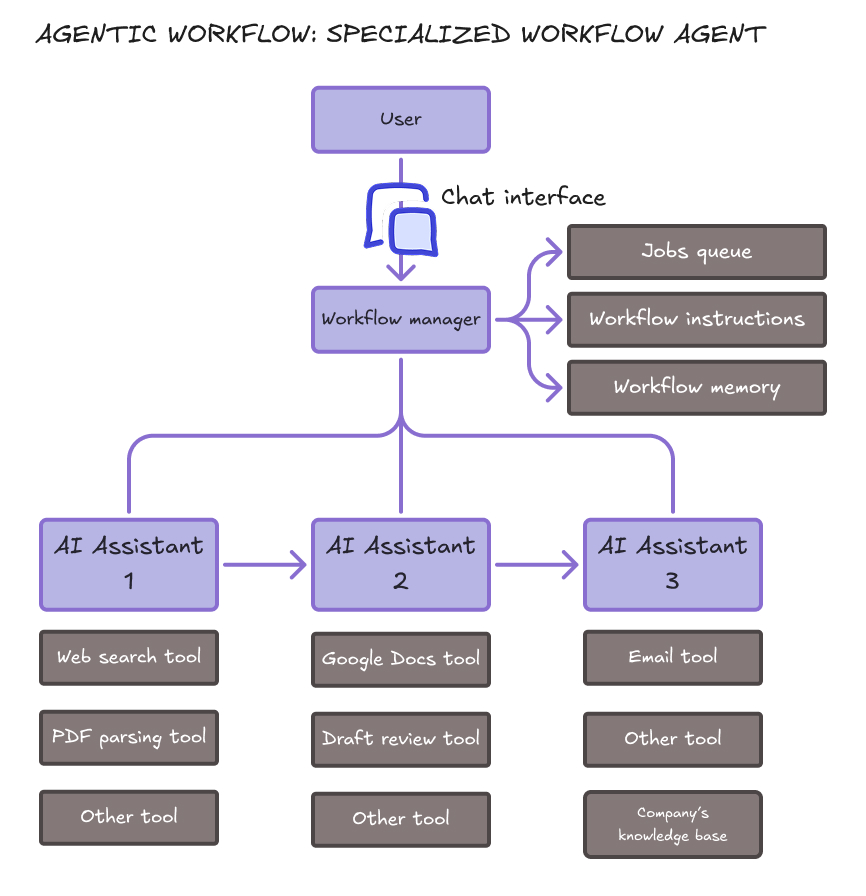
Task #4
A no-code platform like n8n lets you define workflows visually, inserting AI assistants and tools wherever you need.
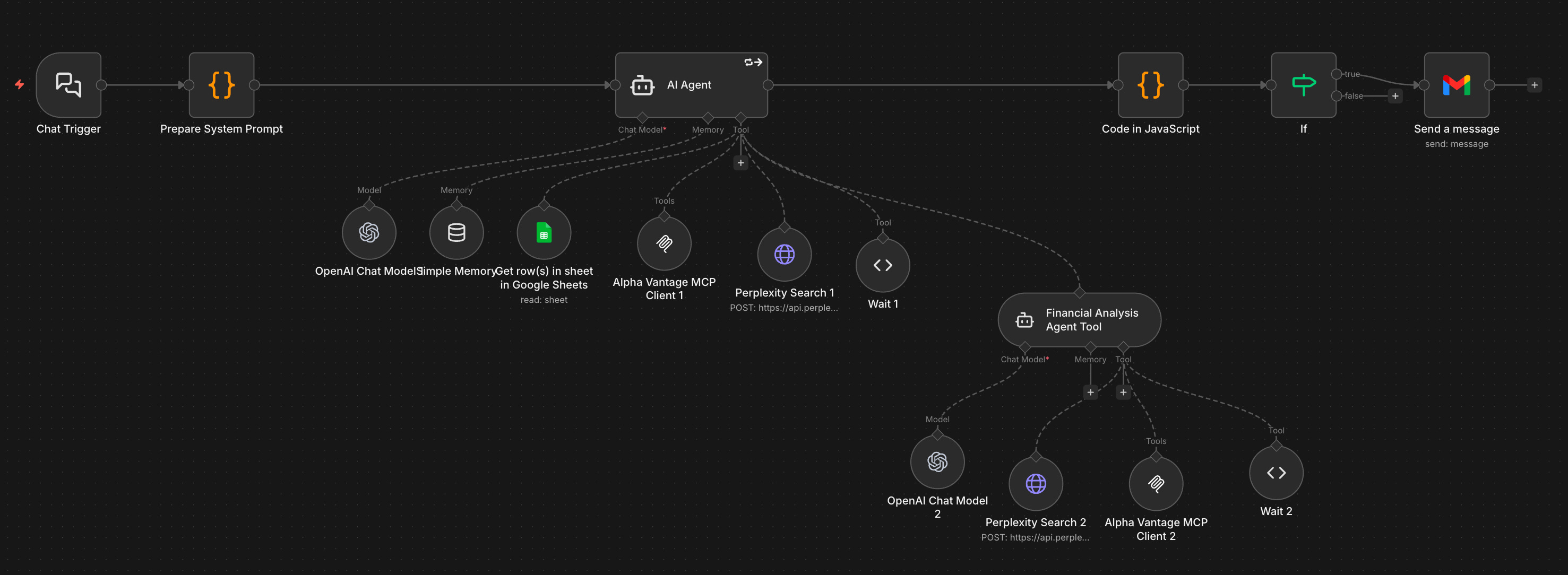
To be honest, if you are just starting with n8n, the learning curve is steep. You should definitely work with two browser tabs side by side, n8n, and a chatbot like Claude to help you. Break your work into small pieces, and ask the chatbot to guide you.
✍️ Your task (optional): Use n8n to create a workflow that completes tasks #1 and #2, analyzing the portfolio and coming up with an initial list of trade recommendations, which are subsequently refined through technical analysis.
This task is optional because I am not convinced that no-code platforms are the way to go in 2026, given the tremendous capabilities of AI coding assistants. Every no-code platform comes with its own limitations, whereas code is infinitely customizable and can now be generated and maintained cheaply with the help of AI.
Still, no-code platforms can make sense for small companies.
⏰ Complete the task, then continue reading below.
Results
n8n makes it easy to create a single agent that can run many tools. I created an agent for the first task and added a sub-agent to complete the subsequent financial analysis.
The results are not significantly better than those from previous approaches, partly because the agent continues to perform web searches in a loop and does not always reach a final answer. Further logic customization is possible, but very time-consuming.
You can download an example workflow for this task at the bottom of this post.
Using a specialized agent created with the help of coding assistants
Using a coding assistant on a laptop for the first time can be challenging because it requires installing not only a code editor like Cursor but also many languages and libraries.
Hence, for this tutorial, let’s learn to work in the cloud: the code will be stored on GitHub, your development environment will run on Ona, and you will control that environment from Cursor on your laptop.
Task #5
Let’s get started:
Go to GitHub and click “New” to create a repository. Type any name, such as “my_private_banker”. Don’t forget to toggle the “Public” button to “Private”. Also, switch on the “Add README” toggle.
In Ona: create a new project after connecting your GitHub account. Select the repository that you just created. Select a “Small” environment.
Once the environment is running, click “Open Cursor”. This will open the environment in your laptop’s Cursor app. Rearrange the window tabs (in View) so that you see the file explorer, the code editor, the agents, and the terminal. Select Opus 4.5 as the Agent.
You should be seeing this:
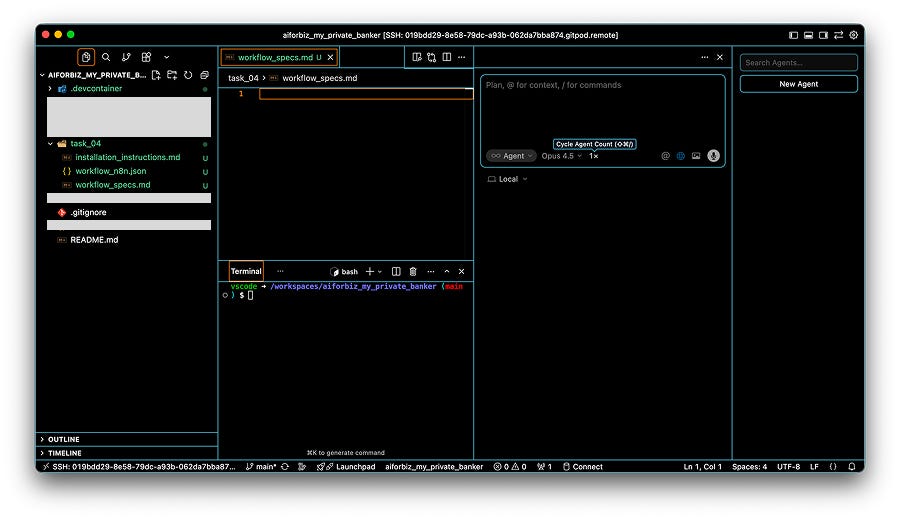
You can use the dialog box to instruct the agent to code your workflow!
✍️ Your next task: Use the Cursor agent to create a Python application that performs an end-to-end portfolio analysis and generates a final report. Build the application by instructing the Cursor agent step by step, tool by tool.
Don’t forget to save your work regularly in GitHub, as the Ona environment is deleted regularly. Refer to the bottom of this post on how to do that.
Tips:
Ask the assistant to use “Streamlit” for the chat interface.
Ask the Cursor agent to use LangGraph as the framework for agentic workflow management.
Put the assistant in plan mode before agent mode.
Instruct your assistant to search online for how to use LangGraph, Perplexity Search API, and Alpha Vantage’s Python wrapper.
⏰ Complete the task, then continue reading below.
Results
It takes much more time to write step-by-step requirements for the coding assistant than to give a generalist agent an overall goal and let it handle it, as we did in tasks #1 and #2. However, the research improves tremendously in terms of quality, depth, and predictability: hallucinations can be avoided, and financial analysis metrics can be fine-tuned at will.
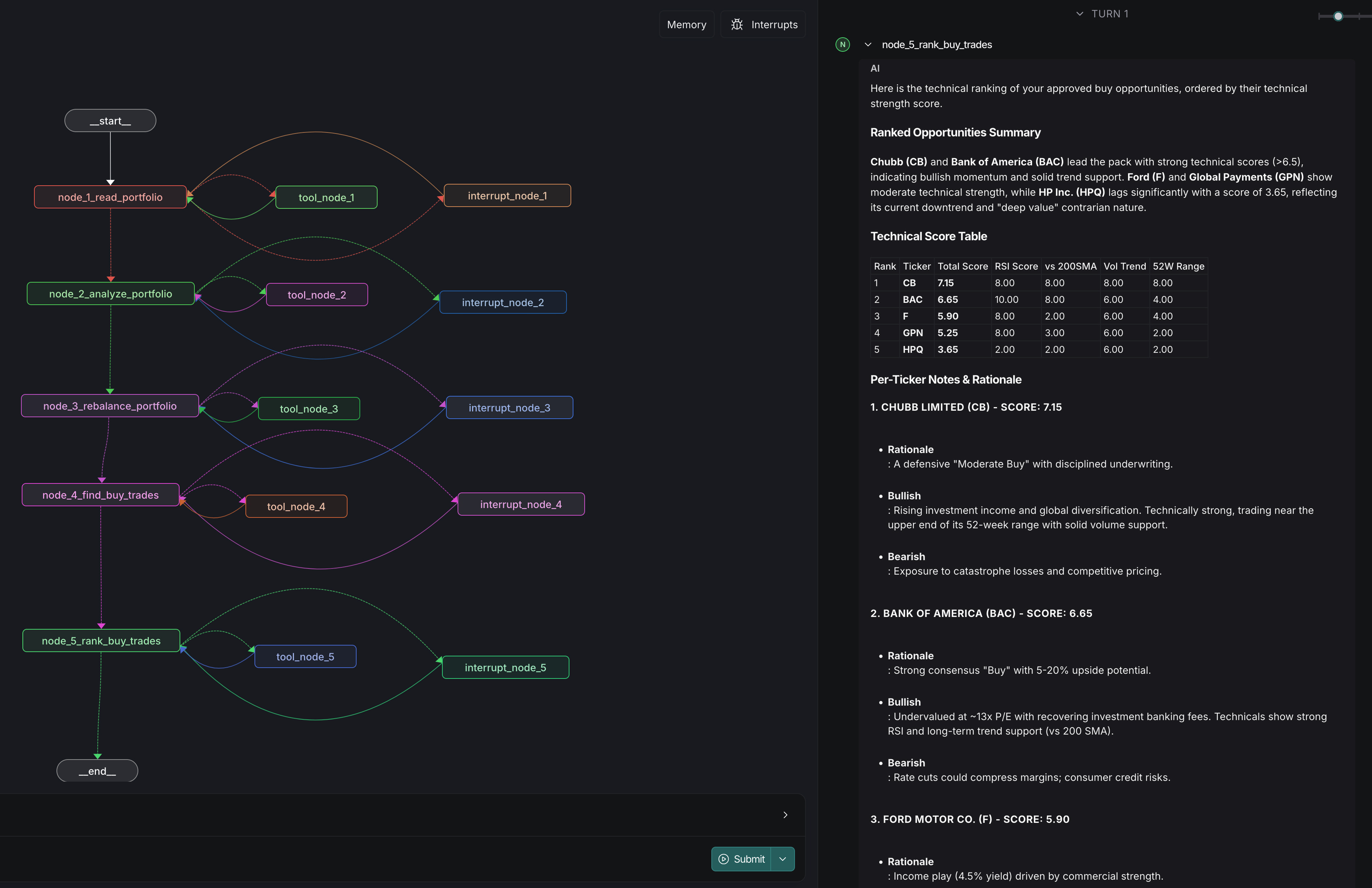
My conversation with the coding assistant spanned dozens of messages. Sharing it verbatim here would not capture the essence of the conversation. But you can download some of the key prompts at the bottom of this post.
Wrap-up
It’s pretty clear that creating specialized agents with the help of coding assistants is the most enterprise-ready approach.
Its main advantage is that it allows you to evaluate and refine workflows with precision over time, based on user feedback. Agentic workflow automation is a process of continuous improvement.
Having said that, generalist assistants are improving rapidly, and it’s definitely worth trying them as the first port of call before developing specialized workflows.
Prompts and code snippets
Refer to the links below to download some of the work outputs.
Prerequisites
Utility to convert your Google Sheet data into a JSON list: Google Colab.
Example of a portfolio in JSON format: link.
Task #1
Prompt (for a dummy portfolio): link.
Task #2
Prompt (for a dummy portfolio): link.
Task #3
Steps to configure the Alpha Vantage tool in Claude: link.
Task #4
n8n workflow (save it as a JSON file and “Import it as File”to use it in n8n): link.
Task #5